Can You Be Tracked When Using a VPN? All You Need To Know
A VPN is often seen as the ultimate privacy tool, but it doesn’t make you invisible. Even with a VPN enabled, there are multiple ways your activity can still be monitored, identified, or linked back to you. From ISPs and governments to websites and hidden tracking techniques, online privacy is more complex than it appears. This article explains how tracking works when using a VPN, and what you can realistically do to reduce your exposure.

Key takeaways
- A VPN protects your IP address, but websites can still track you using browser fingerprints, cookies, and account logins.
- ISPs may not see your traffic content, yet they can still detect VPN usage and collect connection level metadata.
- Governments can correlate VPN traffic with real identities through legal requests, compromised endpoints, or operational mistakes.
- Common user behaviors often break VPN anonymity faster than technical flaws, usually without the user realizing it.
A VPN (Virtual Private Network) is a cybersecurity tool that acts as an intermediary between you and the sites you visit on the internet to guard your privacy. It works by connecting you to a server between you and the web. Any site you then visit will see the server’s IP address, while your personal IP will be safe. This can be used to visit country-specific parts of the internet by connecting to a server in a country of your choosing. But can a VPN be tracked?
With a few exceptions, you cannot be tracked when using a VPN on the web. A VPN won’t help you in a few special cases, such as if your computer is infected by malware, the VPN itself is collecting logs (browsing data) of your activities and others discussed further in this article. In addition to that, it’s important to note that some VPNs are safer than others, for example, decentralized VPNs don’t have a single server that all your browsing data flows to (unlike centralized VPNs) but rather connect you to an independent host and are, as a result, better for your privacy.
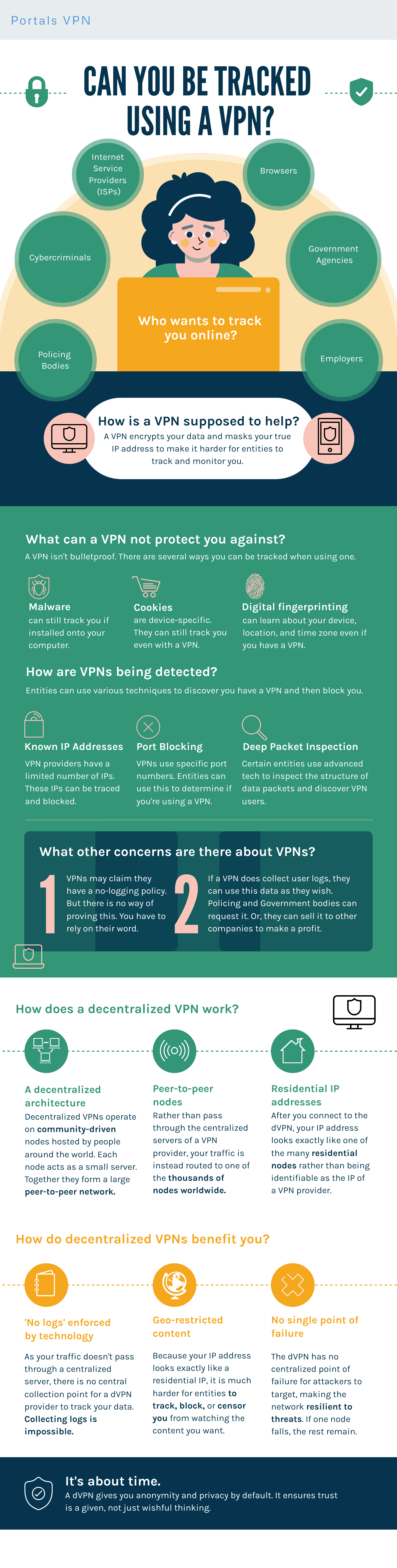
Continue reading to see exactly when and why VPNs can fail to protect you, how your browsing data is tracked, how to stop that, and what kind of VPN is best for keeping your data safe. Feel free to download this easy-to-read infographic to have all of the most important information from the article with you:
Ways that you’re being tracked online
Nowadays, websites use various methods to track visitors even when they are using a VPN. These measures are often aimed at seeking specific data that you share willingly or without even knowing. You will find the most common ways you’re being tracked below.
Cookies
Cookies are small pieces of code saved in your browser when you visit a website.
There are two types of cookies: first-party cookies and third-party cookies. First-party cookies are generally harmless—they are used by a website to remember what you had in your shopping cart, make it easier to enter your login data, save your preferences, etc.
Third-party cookies, on the other hand, are used by advertisement and analytics companies to track your activity across the web and show you ads that should be more relevant to you based on your interests.
How do you prevent tracking via cookies?
A VPN will not stop cookie tracking at all. If you or the website you’re visiting is based in a country or region with cookie consent laws (the EU, UK, Canada, some US states, and more), you have to give your consent to be tracked. Be aware, however, that declining cookies does not guarantee the website will honor your choice.
To be sure, use the private (incognito) mode on your browser, which deletes all new cookies at the end of the browsing session. Alternatively, you can install one of the common cookie blocker browser extensions like the Poper Blocker. If none of these work for you, you can delete all cookies manually from time to time in your browser settings.
How to delete cookies on Google Chrome
- Press the three vertical dots on the top right of your Chrome window.
- In the extended menu, press Delete browsing data.
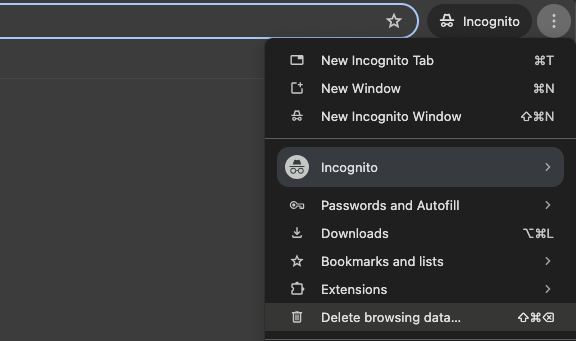
- A new browser tab opens with choices to delete your browsing history, cookies and cache. Deleting your cache is also important, as it might contain old JavaScript code that can be used to restore an older cookie you might have deleted in the past.
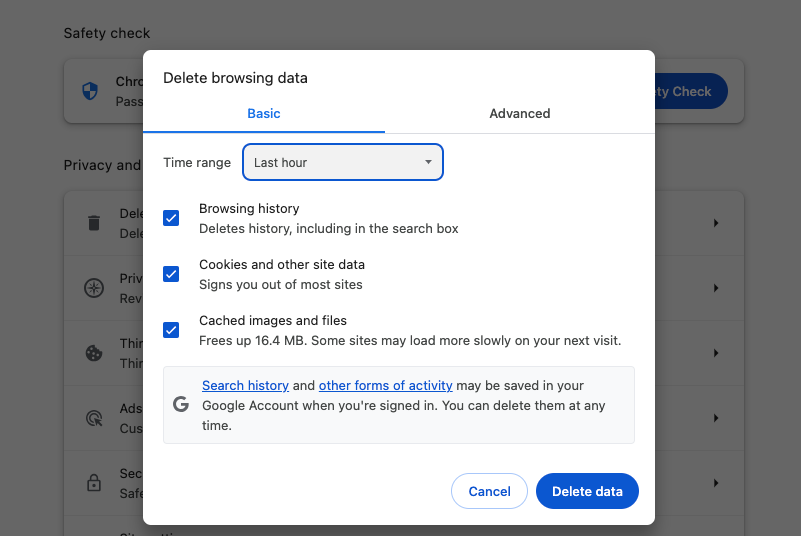
- Choose Cookies and other site data and Cached images and files, pick a time range (we recommend All time), then press Delete data. Your cookies are deleted!
Browser (device) fingerprinting
Browser fingerprinting, also called device fingerprinting, is the act of collecting technical data about a website visitor to identify (track) them. This technique is gaining popularity as an alternative to cookie-based tracking since the reliability of cookies as a tracking measure is falling over time. Its main purpose is to prevent fraud when criminals try to disguise a single device as multiple different ones.
The biggest technical difference between cookies and browser fingerprinting is that while both methods collect data exposed by your browser, fingerprinting stores this data on the server of a website, not on your device, which makes it more difficult to stop.
Using browser fingerprinting, sites can collect data like:
- IP address
- Browser name and version
- Operating system and device model
- Screen resolution
- Browser plugins
- Time zone
- Language, and more
The combination of these data points can be used together with data collection on websites (discussed later) to identify you on the web.
How do I stop browser fingerprinting?
There is no guaranteed way to protect yourself from browser fingerprinting, even with a VPN, according to an article by Fingerprint, a tracking solution provider. In theory, if either you or the website you are visiting are based in the EU, the site can only save your data with your consent. Disagreeing to any sort of tracking when those pop-ups appear is a good start, even though it doesn’t provide guarantees.
If you’re feeling radical, you could disable JavaScript on your browser, but that will render most websites unusable. In addition to that, doing this does not stop websites from seeing your IP address, browser settings (type, language) and operating system, as explained by Fingerprint.
Another method is to use a tracking blocker browser add-on such as Privacy Badger. You might be giving away device/browsing data every time you install one of these add-ons, as they can have access to your browsing activity, but it’s usually the lesser evil. A privacy-oriented browser like Brave is a good alternative too, with a wide array of tools working behind the scenes to protect your privacy.
Also be aware that even purpose-built tools such as these cannot stop all forms of device fingerprinting. Additionally, since fingerprinting involves tracking your browser add-ons, such blockers can become just another measure to identify you.
While the aforementioned techniques do strengthen your privacy, one of the most effective measure to circumvent browser fingerprinting is using an Android emulator. An Android emulator is a digital tool that replicates a unique, physical Android device and can be used on MacOS, Linux or Windows. An Android emulator’s primary purpose is testing apps designed for Android, but it can also be used to browse the web while keeping your actual device information secret. Just remember to modify the settings of your digital device every time to maximize safety.
IP address tracking
Your IP address is like a digital version of your home address. Using it, bad actors or the government can identify your physical location. All websites that utilize an analytics tool can track the IP addresses of their visitors. This, in itself, is not a malicious practice - just website creators wanting to know where their visitors come from.
IP addresses are considered sensitive private information, as the websites you visit or your ISP could give it away to the government, which would find out your identity based on your physical address.
IP address tracking can be avoided simply by connecting to a VPN. If you visit a website when connected to a VPN, it will only see the IP address of the VPN, but not your real one. Other possible measures include proxies and Tor, but a VPN is the most user-friendly and accessible to everyone.
With that in mind, be aware that there are cases when your real IP address can be exposed even while using a VPN. This can happen if your VPN connection drops for some reason, such as server failure, or when a DNS leak occurs (we talk about that later on). The best VPNs prevent damage from sudden connection drops by offering a “kill-switch” - a feature that cuts your internet connection entirely if the VPN disconnects, keeping your IP secret.
Another way your IP address could be found is by using fingerprinting: if a user logs into the same website from another IP, but has an identical device and engages in similar actions, it’s probably the same person, only using a VPN.
Tracking pixels (web beacons)
Tracking pixels are literal 1x1 pixels placed on a website or email to track you. When your browser loads the tracking pixel, the action is recorded in the server of the company operating the pixel. They are mostly used for retargeting, as these pixels can recognize you across multiple websites. Ever notice how you are served an ad for an e-commerce store you visited yesterday, even though you are currently on a completely unrelated website? That is called remarketing and it’s done through tracking pixels.
Tracking pixels are very widely used. According to statistics by w3techs, 10.7% of all websites on the internet use the Facebook tracking pixel, which associates your browsing activity with your Facebook user profile. This is just one of the myriad of pixels found on the web.
These pixels, also called web beacons, record similar information to browser fingerprinting:
- IP address
- Device
- Browser type/version
- Screen resolution
- Actions on the website/email
You can protect yourself from tracking beacons by using a privacy-focused browser such as Brave or enabling pixel protection in the settings of the one you currently use (if it’s available). If you don’t want to be tracked when opening marketing emails, turn off automatic image loading in your email application - then the tracking pixel won’t be loaded either. As is the case with cookies and fingerprinting, pixel-based tracking is only legal within the EU with user consent. However, websites sometimes ignore these regulations, so there are no guarantees here.
Using just a VPN would only protect your IP from getting recorded by web beacons, as it does not conceal your device data.
Email tracking
Marketing and sales email analytics are more complex than ever. A study by S. Englehardt, J. Han, and A. Narayanan found that around 70% of all emails that come from popular mailing lists contain trackers.
A sender can not only know if you opened their email, but they will also know exactly when you did it, your IP address, and approximate location. If you press a link and end up on the sender’s website, the pages you visit, the buttons you click, and the products you buy or add to your cart will also be tracked.
Email tracking works via tracking pixels embedded in your emails. We discussed this sort of tracking earlier in the article and everything in that section also applies here.
Email tracking can be drastically reduced by disabling automatic image loading in your email client. Since the tracking pixel is an actual image, it simply won’t be loaded when you open your email. In addition to that, reduce risk by reducing your overall information footprint: use a VPN, delete cookies often, and don’t give out personal information anywhere on the internet.
Data collection on websites
It’s no secret that every website collects some sort of data on their visitors to track marketing effectiveness, improve the design/layout of pages, and learn more about their customers. This sort of data is not usually personalized (not connected to a particular user, but rather aggregated in a large dataset). Nonetheless, in this case, the user’s IP address is indeed recorded, which is information that the user might want to keep private.
IP address is indeed recorded, which is information that the user might want to keep private.
In addition, another level of tracking begins when you log into a website. Your user account might contain personal information such as:
- Name
- Telephone number
- Home address
- Bank account information, etc.
All of these can be then connected to your IP address and your activity on the website: which pages you visit, and what products/services you buy. If the site in question is social media like Facebook, X, Instagram, or other, your post likes and comments, followed pages, friends, and even private messages are all tracked, as indicated in the Facebook data policy.
A phenomenon noticed by users is that some social media platforms record through your device’s microphone even when you are not using it. Keep in mind that this can only be done if you have a social media app on your phone, such tracking is less likely to happen through a browser.
Website tracking can be defended against by using a VPN, which will keep your real IP address secret. Despite that, if you have logged into a website your information is no longer secret - if you willingly gave it away when creating an account with real data.
Mobile device identifiers
Each smartphone has a unique ID code that is associated with that device. On Apple devices, the code is called IDFA, while the Android equivalent is GAID. These IDs are used to identify you as a user and to attribute data about your activity from different apps in one place.
Both Apple and Android device identifier use can be turned off.
Turning off the Android device identifier
- Go to the settings of your device.
- Find the Privacy section.
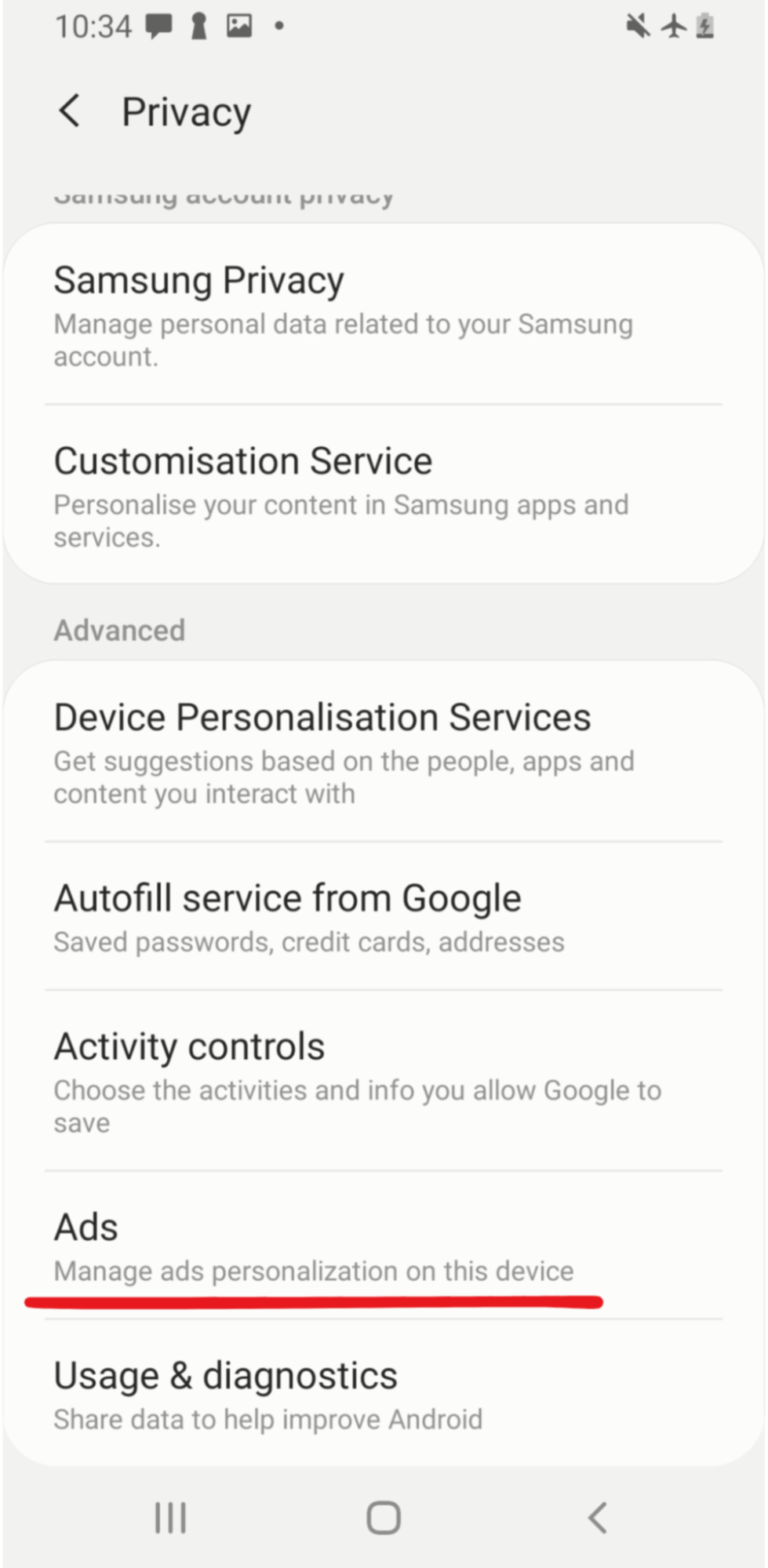
- In it, go to Ads.
- You will see your device’s advertisement ID and an option to delete it: Delete Advertising ID.
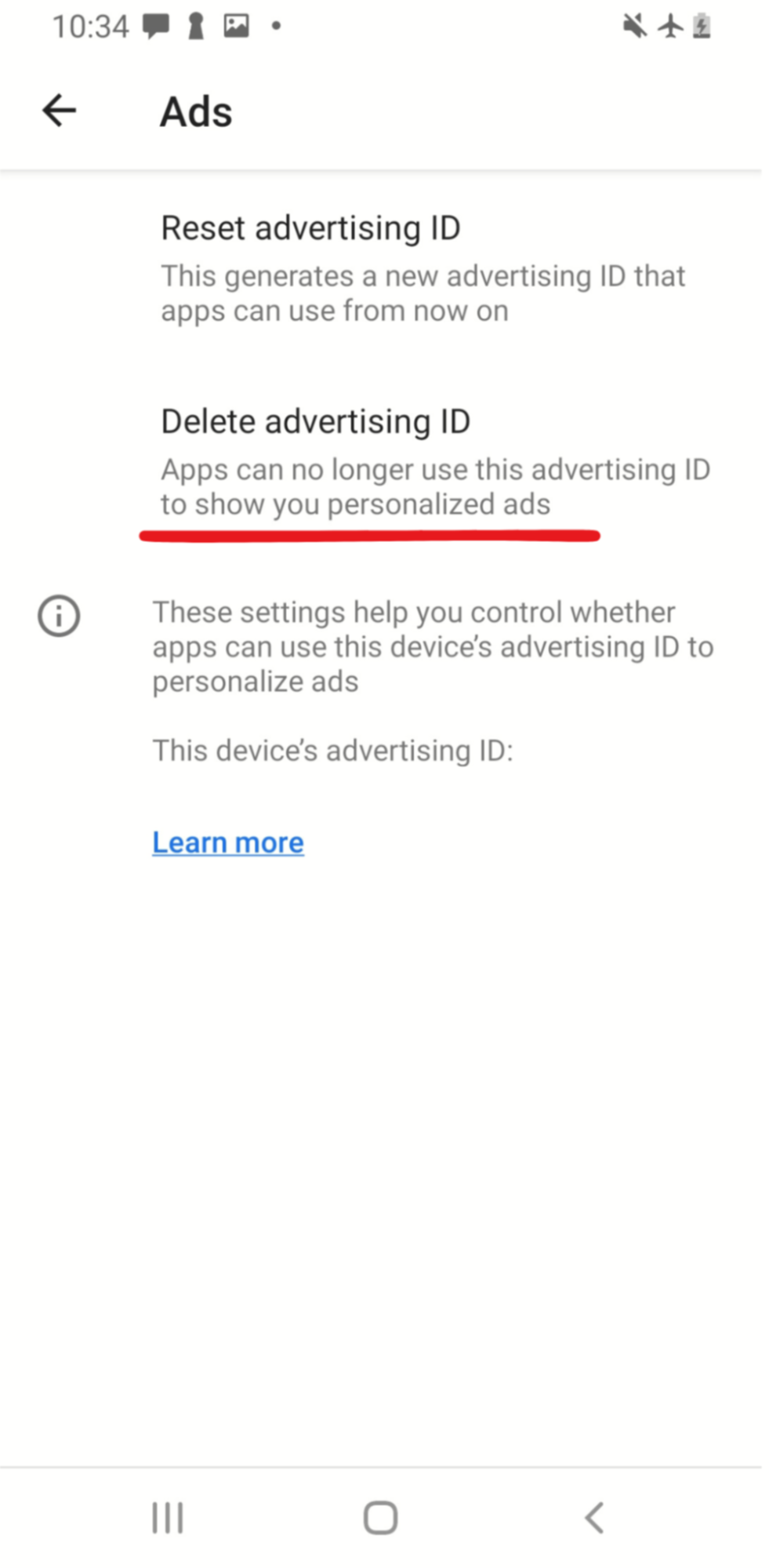
- Confirm your choice in the pop-up window.
Turning off the Apple device identifier
- Go to the settings of your device.
- Find the Privacy section.
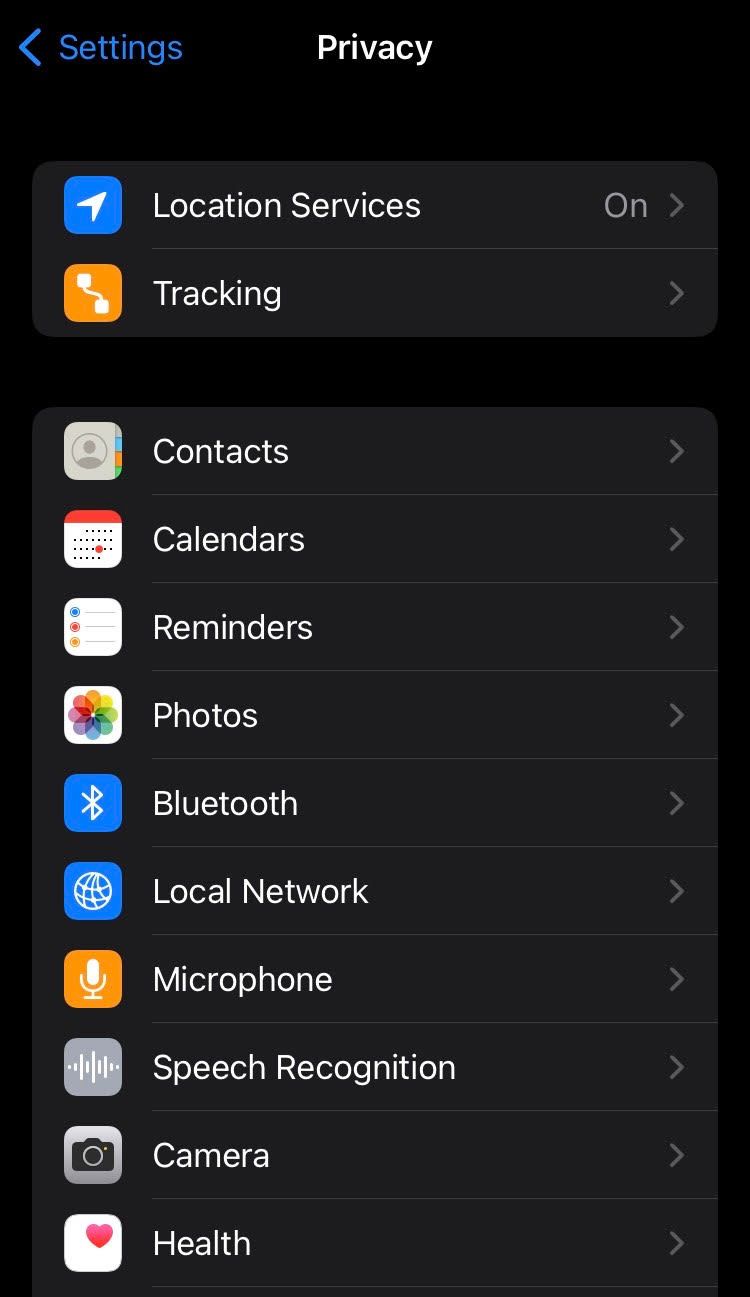
- In it, go to Tracking.
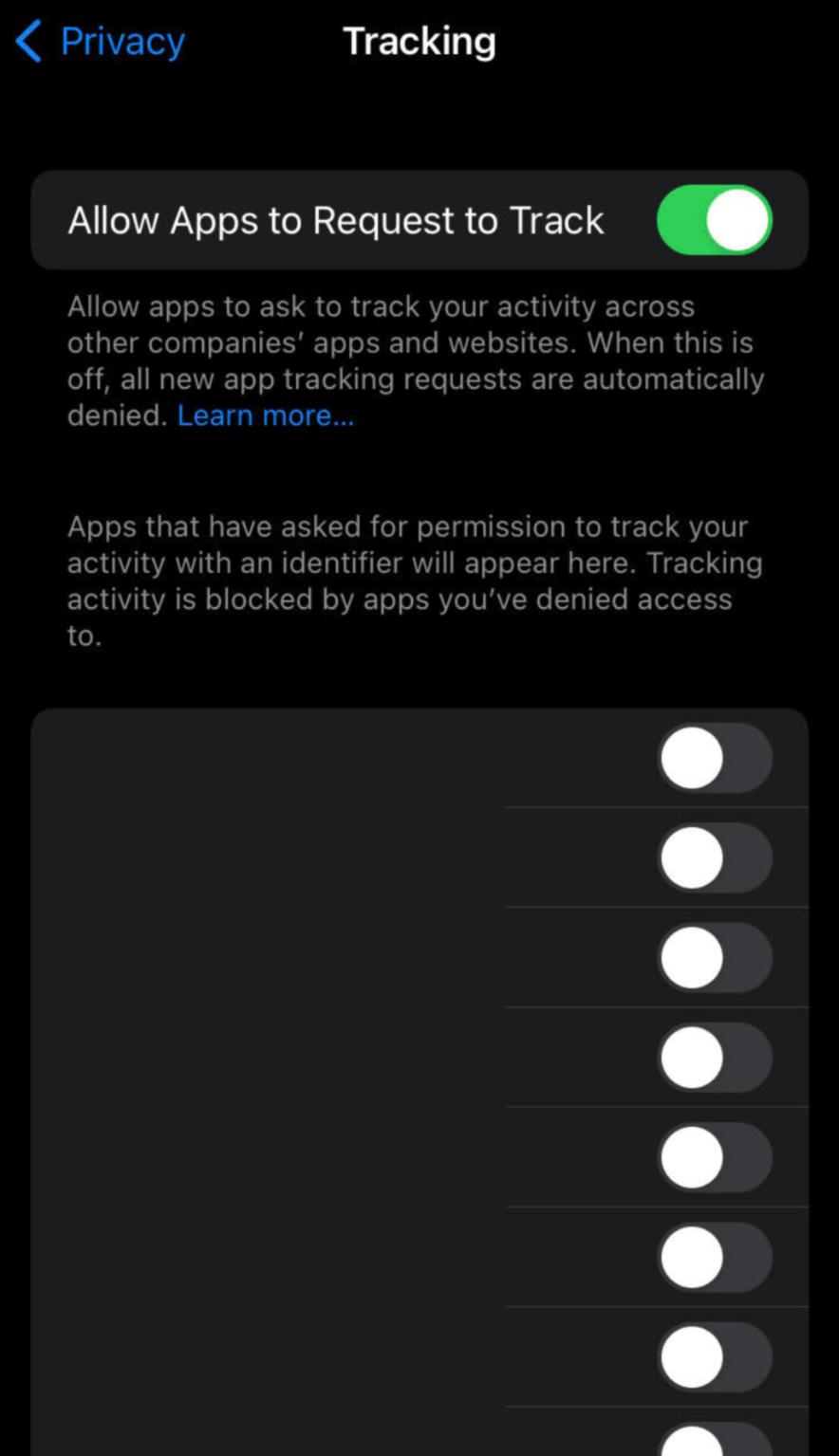
- You will see a global setting at the top of the list, called “Allow Apps to Request to Track”, disable it. This way you will ensure no apps get access to your IDFA and will only be able to track your activity within a single application.
Malware and spyware
Malware, short for “malicious software”, is software designed to harm your computer, steal your data or hold your hardware for ransom. Types of malware include viruses, adware, ransomware, trojans, and more.
Spyware is a type of malware that tracks user activity on the infected computer and sends collected data to a third party. It is most commonly used for stealing and selling private data and imitating your identity.
Your computer can be infected with malware even when connected to a VPN. VPNs do not protect from malware whatsoever. The best kind of prevention against malware is common sense: don’t click on suspicious links, don’t open emails from senders you don’t know, and don’t download software from sites you don’t trust.
If malware or spyware successfully infects your device, it can only be fought with specialized anti-malware programs, also known as antivirus. To get rid of malware, first install an anti-malware program: the most common ones are Bitdefender, Avast, and Norton. Secondly, run a computer scan in the program. If any malicious software is found, the anti-malware software should take care of it. To be 100% sure though, a clean reinstall of your operating system is required.
DNS leak
A DNS leak is the act of sending domain resolution queries to your ISP’s DNS servers instead of those belonging to your VPN provider when you are connected to a VPN. A VPN normally acts as a tunnel that protects all data flowing between you and its servers. Whereas during a DNS leak, your ISP can see the websites you visit, even though you are using a VPN.
It can mostly happen if you are using a sub-par VPN that does not have its own DNS servers or does not support the latest type (IPv6) of IP addresses. Finally, the VPN might simply be configured incorrectly.
To avoid losing your privacy to a DNS leak, search for DNS leak tests online to see if this problem affects your VPN connection. If there is indeed a leak, the easiest fix is to simply change your VPN provider or to contact their customer support.
App tracking
Many apps on your mobile or other type of smart device track your activity as you’re using them. Similarly to when visiting a website, this is done to improve the layout of the application, understanding which features are the most important to users and generally improving services.
Mobile app tracking and collected data as a result of it is usually aggregated in large numbers and is not being used to identify you personally. We do enter the morally tricky territory when apps track your activity across other apps in your phone - as this can be used to form an identity profile of your preferences, interests, income, family status, and more.
Device app tracking cannot be fought against with the help of a VPN, because your activity within your device itself is tracked in this case. The best thing you can do is turn off any device settings that allow cross-app tracking and disallow any sort of non-obligatory tracking both in each application and in your phone settings.
Finally, when choosing which apps to install, see what permissions the application is asking for and think whether they make sense for the application. Does a card game need your microphone or camera access? Most likely not. Perform an audit of your existing apps and delete those that want to know too much about you.
How are VPNs being detected?
Using a VPN can help you hide important private information. However, the fact that you are using a VPN at all is not that easy to hide. The reason why you might want to hide VPN use are to avoid censorship or government attention and access certain websites that block VPNs. Here are some of the most common VPN detection methods and ways to prevent them.
IP lists
Lists of IPs used by the biggest VPN services are collected by interested parties. According to TechRadar, these lists are commonly used by streaming services to prevent people from accessing another country’s media library. The best way to circumvent this is by using a VPN that offers a dedicated IP, an address that only you would have access to. With that said, be aware that these IPs are not immune to IP blockers, just less likely to be picked up by them. Also, if you are always using the same IP address to browse the web, you are more easily tracked.
Alternatively, you can use a decentralized VPN (dVPN) which uses the IP addresses of regular people across the world, making you look like a normal internet user. This is safer than a dedicated IP since you will change your IP from time to time in this case.
Port numbers
Certain VPNs use particular internet ports for their connection, for example, OpenVPN (UDP) employs port 1194, whereas IPsec (UDP) uses port 500. Even though connecting through a certain port is not concrete proof that a user is connected to a VPN, it can be used with other evidence to paint a full picture. Avoid detection by changing to the TCP port 443 in your VPN settings. It is commonly used by the HTTPS protocol and doesn’t look suspicious, although such a setting is not available for all VPNs.
Note: detection by port numbers is only applicable to network owners: your school, workplace or ISP. Port numbers are not visible by the websites you visit.
Deep packet inspection
DPI (Deep Packet Inspection) is a series of methods for close inspection of each internet packet passing between you and the web. It’s used by government agencies to detect VPN use and even possibly identify the type of data sent over a network, or in some circumstances, even the encrypted information. The best thing you can do as a regular user is to choose a VPN that offers obfuscated (hidden) servers, which disguise VPN traffic as something else, avoiding some DPI methods, as claimed by Comparitech. Finally, if you are not a criminal or a dissident, you shouldn’t worry about DPI.
Time zone mismatch
If you connect to a VPN server on another continent, you will theoretically be in another time zone. At the same time, your browser might give away the time of your device’s clock - which will be your real-time zone. This difference is a clear sign of VPN use. Hide against device fingerprinting by installing privacy-boosting browser add-ons like Privacy Badger.
Can the police trace that you are using a VPN?
Yes, the police can trace that you are using a VPN because all of your internet traffic goes through a single external server. In spite of that, your browsing activity remains secret because it’s heavily encrypted by a VPN.
If the police have an interest in your browsing activity, they have two main avenues of tracking it: requesting information from your ISP or asking your VPN to hand over your browsing logs.
If you browse while connected to a VPN, the ISP can only see that all of your traffic goes through a VPN server, but not what sites you visit or what you do in them.
Law enforcement agencies have every right to retrieve your browsing logs from a VPN provider if they exist. In theory, reputable VPNs feature a no-log policy and promise not to collect data about your activity. However, there have been multiple cases of no-log VPNs handing their users’ logs to the police: IP Vanish in 2018 or PureVPN in 2017, for example, according to Vpnleaks.com.
In addition, if the police already know that you are a citizen/resident of their country, there is a theoretical possibility that they might find you even if you are using a VPN. For example, if they see a mean comment you made about the government on a public forum, they could ask the website to provide its time stamp and the poster’s VPN IP address. Then they could ask all ISPs in the country for a list of clients that were connected to that VPN at that time. This would narrow down the list of possible commenters significantly and might be enough to find out who made the comment.
The same rules apply to all law enforcement agencies, the CIA, the FBI, and similar - they cannot track your browsing activity with a VPN unless they receive logs from the VPN itself or from websites you visit. The police are not the only government agency that might want to track you.
Can the government track you when you use a VPN?
There is no clear evidence that the government can track you when you use a trusted VPN. A VPN connection that uses the newest encryption methods is nearly impossible to crack, therefore, one could claim that VPNs excel against government tracking.
Some methods of tracking your use of a VPN do exist, but they are more of an exception than a rule. Government agencies might ask your VPN provider to hand over your browsing logs if they exist. They might also peek at what you are doing if the VPN connection drops or is exposed to a DNS leak. Finally, they might confiscate your physical devices and analyze your browsing history stored inside.
To minimize the chance of being tracked by a government agency, refrain from breaking the law, avoid sharing your personal data on the internet, use different strong passwords for your accounts, and obtain a trusted VPN that does not track your browsing data.
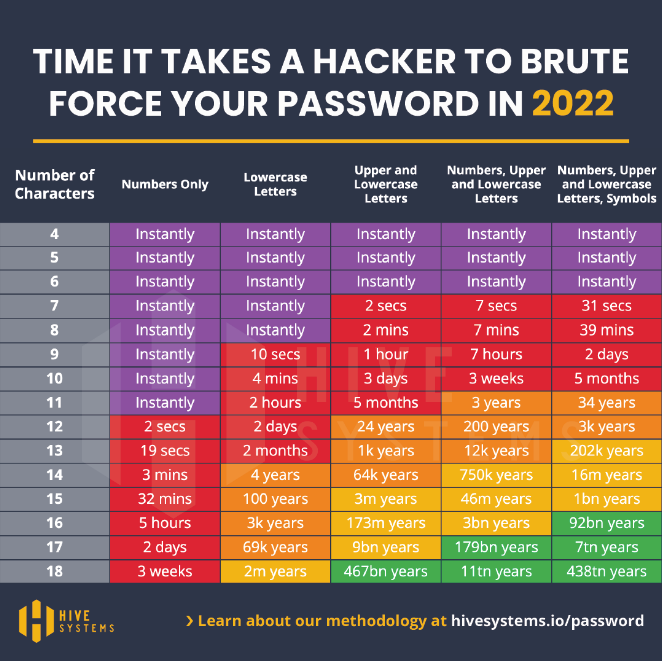
Here is a useful table to understand how to create a strong password, courtesy of Hive Systems.
Can Google track you when you use a VPN?
Google sites can track you even when you are using a VPN. This happens when you are logged into an account within the Google ecosystem (Gmail, YouTube, Google Ads, and others). Google can connect browsing activity, location, and other personal data that you provide in your account across these websites.
In theory, this sort of tracking is not considered predatory, as it’s mainly used for analytics, to improve services, and to provide you with more relevant advertisements. Despite that, it is important to know that if you are a person of interest to a government (suspected of criminal activity), law enforcement agencies can request your data from Google directly, according to their privacy policy.
Also mentioned is the fact that Google can track your location even when you are using a VPN through a mobile device’s GPS data, nearby Wi-Fi hotspots, cell towers, Bluetooth devices, and sensors.
The most simple way to prevent tracking by Google is to use a VPN in conjunction with private mode (incognito) on your browser (or a privacy-focused browser such as Brave, which would also need to be used with Incognito mode), not log into any accounts if possible or using anonymous accounts. In addition, disabling all trackers on your browser or device like location services is a must for ensuring privacy.
If you need to use a Google account, connect to a VPN, open an incognito window on your browser, create an account without any real personal information (name, address), and use a burner (temporary) email address.
Can an employer track you when you use a VPN?
No, your employer can’t track your activities when you are using your own VPN on your personal device, yet they can still see that you are connected to an external VPN service.
Connecting to your own VPN on an employer’s device might sometimes be difficult, as some employers block certain ports to limit personal VPN use.
Another possibility is that you are using a business VPN provided by the company. A business VPN is used by employers to improve data security. Certain websites, applications, or even data within the company’s servers can be made available only to users connected to a business VPN. It’s important to note that employers can track a VPN and your activity if they are the ones providing the service.
The difference between a business and a commercial VPN is that your employer has access to all of your browsing activity and can use it against you. Take this as a warning to not engage in any illegal activity, that is against the rules of your company, or is a detriment to its well-being when connected to your employer’s VPN.
Keep in mind that devices provided by your employer can have tracking software installed that sees things like time spent working, browsing history, keystrokes, or even your screen feed. Some tools such as Insightful, keep employee logs for up to two years, according to their marketing material.
A simple rule of thumb is the bigger the company, the higher the chances of its equipment having tracking capabilities. 80% of the major US companies track their employees, according to a study by the American Management Association.
To avoid being tracked by your employer, do your browsing on a device you own, don’t use the company’s Wi-Fi, and connect to a VPN for extra security. If you are on employer premises, you can still be seen on CCTV cameras, which can track your screen, the passwords, and other data you type on your keyboard.
Can online advertisers track you when you use a VPN?
Yes, online advertisers can track you even when you use a VPN with the help of cookies. You will most likely see advertisements in the language of the country your VPN server is based in, which implies that your real location is indeed concealed. Keep in mind, however, that the websites you visit will save cookies on your browser which can still be used to track your interests and other websites you visit.
You can prevent tracking from online advertisers by using a VPN in conjunction with the Incognito (private browsing) mode on your browser since it doesn’t keep any cookies after your session is finished.
To finish a session correctly:
- Close all incognito windows you were using
- Disconnect from your VPN
Can your Internet Service Provider track you when you use a VPN?
No, your ISP (Internet Service Provider) cannot track you when you use a VPN. They will be able to see that you connect to a certain IP (the VPN server you use) and send a lot of traffic to it, but your actual activity, the sites you visit, comments you write or the goods you buy while using a VPN is secret.
The ISP could, in theory, ask your VPN service to provide logs of your browsing activity if they are really interested in what you are doing, but they would have no legal means of enforcing this request, unless the two companies have close relations of some kind (common owner, business partnership, etc.). A VPN provider would only have to give any data they have on you (that is if they have any) to law enforcement agencies, not private companies.
Which VPN is the best at fighting tracking?
The best VPNs at fighting against tracking need to fulfill three criteria:
- Have a no-logs policy
- Have a clean track record of handling customer data
- Be decentralized (to reduce the ability to centralize logging)
PortalsVPN ticks all of these boxes and is therefore one of the best VPNs at fighting tracking. It offers over 10,000+ IP addresses in 120+ countries, so you will be able to change your virtual location often. Choose between hard-to-block residential or faster datacenter VPNs according to your priorities.
The VPN also provides a kill-switch, which will turn off your internet connection in case the VPN disconnects. Your connection is protected with military-grade AES-256 encryption too.
In addition to that, PortalsVPN can be used on 10 devices at the same time so you can share your account with your family and protect your household.
As a decentralized VPN, Portals has significantly fewer capabilities for tracking user activity due to its design, which makes it a terrific option for protecting your online privacy.
VPN vs. decentralized VPN: Which is better to avoid being tracked?
A VPN is called centralized when all of its servers are owned by the company providing the service. A decentralized VPN means that a user will be connecting to the internet through a network of nodes - connection points owned by individual users across the globe.
The main benefits of decentralized VPNs are improved privacy from the service provider and better chances of beating censorship. Thanks to the fact that users transfer data through a randomly selected shared node, the decentralized VPN service provider has no technical means of keeping logs of your browsing activity. This comes in contrast to centralized VPNs, which have the technical capability to keep logs that they might hand over to government agencies if requested. In addition to that, the thousands of private IPs (owned by regular users) you can connect to with a dVPN are very unlikely to be blacklisted by a government aiming to censor you or the streaming services you want to watch.
The strong points of a centralized VPN, on the other hand, are mostly based on the trust of the company providing the service, as they will be handling your browsing data, hosting all of the servers, and be responsible for your protection. For example, the centralized servers of these companies are well-protected against hacker attacks and are constantly maintained to maximize uptime. On the other hand, there is a theoretical possibility that the same staff can access your data and leak it, even without the parent company knowing. These big servers are optimized to be able to provide high browsing speeds even under heavy traffic, but are not immune to technical failures, restrictive actions of authoritarian governments, and cyber attacks.
To summarize, there is no such thing as an untrackable or undetectable VPN. However, a decentralized VPN is more likely to help you avoid tracking online.
| Category | Centralized VPN | Decentralized VPN |
|---|---|---|
| Tracking | Depending on the trustworthiness of the provider, logs of your browsing activity can be collected. These logs can be used against you by law enforcement. | The independent node structure you connect through prevents the VPN provider from seeing and logging your activity. |
| External vulnerability | Servers of respected VPNs are well-protected and have few vulnerabilities to hackers. | The individual nodes might have less hardcore protection, but also provide fewer reasons to be hacked. A hacker can’t do much with access to a single node. |
| Speed | Centralized servers are optimized for high amounts of traffic and fast browsing speeds, but might experience high loads. | Depending on the nodes you use, the browsing speed might be slower or faster on a decentralized VPN. |
| Censorship | A single entity that can be limited by authoritarian governments, asked to cooperate with law enforcement, and shut down. | A network of separate nodes that are difficult to find, track, and limit by governments. |
| Appearance when browsing | Big servers are only able to provide a single IP for thousands of users, therefore, any site, government agency, or service with access to VPN IP lists will be able to restrict your access. | A dVPN allows you to use individual, residential VPNs, which are indistinguishable from a regular user and are very unlikely to be blacklisted by websites or streaming services. |
Can VPN providers track you?
Centralized VPN providers might track your activity as you use their service. Usually, this is done without malice, as such data is used for improving services, maximizing server connection quality, etc. However, some VPN service providers are less honest than others.
Since all of your browsing data is collected in one place, centralized VPNs have datasets that can paint quite a detailed picture of their users and are therefore quite valuable. Some centralized VPNs choose to sell their users’ data. As they have to generate income somehow, free VPN providers are often the worst offenders, according to an article by the Independent. In-app ads are also an annoyance that invades your privacy when using free VPNs, so they should generally be avoided.
No-log policies are common in the VPN industry. They indicate which VPN services provide more privacy by not keeping their clients’ private data. Not all no-log policies are trustworthy, though. In 2020, 7 no-log VPNs accidentally leaked detailed user data of over 20 million users, according to PCMag, proving that their promise was fake.
On the other end of the scale, decentralized VPNs simply do not have the technical means to track you, as your connection is distributed through independent nodes. Therefore, a dVPN, compared to a VPN, provides much more relative privacy for users.
The smaller your digital footprint, the lower the probability of anyone tracking you online. VPNs are just tools to conceal some of your internet activity. In order to remain private online, you still need to maintain hygiene: delete cookies often, don’t share personal information when possible, and use privacy-focused internet browsers and search engines like Brave and DuckDuckGo.
How to minimize tracking risks while using a VPN?
Follow these practices to maximize your privacy when using a VPN:
- Choose a decentralized VPN
- Use incognito mode on your browser
- Invest in a cookie/tracking blocker browser add-on
- Use burner email accounts
- Don’t post private information online
- Contact people through encrypted messaging apps like Signal or Telegram
- Clear cookies often
- Use different strong passwords
Note: when using messaging apps, make sure the particular chat you are using is encrypted, as Telegram, for example, does not have encryption enabled by default.
VPN alternatives
If your privacy is important, you should always use a VPN to protect it. A VPN does not guarantee absolute privacy on the web, but it does much of the heavy lifting for you.
In case you have a reason to avoid VPNs, there are a few sound alternatives. Note that most of the alternatives mentioned below are less user friendly than a VPN and require at least some technical knowledge.
Proxy and remote desktop
Proxies and remote desktops essentially serve the same purpose - they are a means to connect to an IP in another location. A proxy does that by connecting to a server, while a remote desktop connects to an actual physical computer. Both of them hide your IP but don’t encrypt your data, leaving it vulnerable to hackers on public Wi-Fi and visible to your ISP.
SSH tunnel
An SSH tunnel is very similar to a proxy in the way that it connects you to a single server elsewhere. The difference is that an SSH tunnel encrypts the data between your device and the server, effectively hiding your IP address and safeguarding your information from eavesdroppers. However, a significant drawback is that setting up an SSH tunnel can be complex and requires technical knowledge, making it less user-friendly compared to VPNs.
Personal VPN
If you don’t trust commercial VPN providers, you can set up your own VPN on your server. A VPN hosted on a virtual server, on the other hand, would allow you to appear as if you are connecting to websites from a different part of the world.
The benefit of setting up your own VPN is that you will be “sharing” your data with less entities, only the host of the server. The drawback, on the other hand, is that you will be responsible for most of the security of the setup, which can be risky if you don’t know what you are doing. In addition, you won’t be able to change your virtual location as easily as you could with a commercial VPN and any activity using a personal VPN can be easily linked to you as you’ve most likely purchased the hosting server using your personal credentials.
DNS resolvers
If your main goal is to bypass browsing restrictions and not much else, a DNS resolver such as the 1.1.1.1. provided by CloudFlare could be a viable alternative to VPN. You can use it to access geo-restricted content, much like with a VPN.
A DNS resolver is a service that translates website domain names into their IP addresses, allowing you to type “google.com” into the browser instead of the complex numerical IP address like “172.217.14.206”. Your ISP normally provides this service, but you can opt for a public alternative instead.
The pros of using a public DNS resolver are that it might make connections to the internet faster, as the public service might be more optimized. This is not a guarantee though, as your ISP might also prioritize internet traffic that goes to its own DNS servers, negating the benefits of a public DNS resolver. Additionally, using such a service might help avoid ISP-enforced restrictions, such as banning adult content or other types of websites. Some DNS resolvers include malware or phishing protection too.
The cons of using DNS resolvers instead of a VPN are that they do not encrypt your internet traffic and don’t route all of your traffic through a server, only facilitating queries for specific services.
Whichever option you choose, always keep in mind that keeping your digital footprint small is critically important to avoid tracking, together with using a VPN, proxy, or remote desktop.