Undetectable VPN: How to effectively avoid VPN detection?
Many users assume VPN detection is unavoidable and that once a VPN is blocked, there are no reliable ways around it. In reality, VPN detection relies on specific technical signals, not guesswork, and some approaches are far harder to flag than others. While no VPN is truly invisible, understanding how detection works makes it possible to reduce exposure significantly. This article explains why VPNs are detected, how blocking happens, and what actually improves your chances of staying unnoticed.

Key takeaways
- VPNs are detected through IP reputation, traffic patterns, browser fingerprints, and deep packet inspection rather than simple encryption checks.
- Centralized VPNs using shared data center IPs are the easiest to block and fingerprint at scale.
- Residential IPs and traffic obfuscation drastically reduce detection compared to standard VPN setups.
- Proper configuration and leak prevention matter as much as the VPN provider itself when avoiding detection.
A VPN is a widely used cyber security tool that encrypts your connection, hides your IP address, and allows you to change your virtual location. Around 1.6 billion people around the world, as estimated by Surfshark, use this tool as the basis for protecting their identity online and a step towards maintaining anonymity. With its popularity, also comes attention - numerous websites, services and even governments try to detect and restrict users that employ a VPN. When your VPN use is detected, you might lose access to geo-restricted content, government services, social media, etc.
With this in mind, you might wonder whether an undetectable VPN exists - the short answer is no, it does not. VPNs, especially the centralized type, generally have a few characteristics that can be used for their detection:
- IP addresses shared among users and subsequently blacklisted
- User system settings not hidden and used to find discrepancies in location or time
- Flaws in VPN settings or setup might give away a user’s real IP address
Some VPNs have features that improve their chances of not being detected, such as server obfuscation (disguised traffic), offered by some VPNs. dVPNs, on the other hand, have a lesser probability of detection in general - their use of residential IPs puts them a step ahead of centralized alternatives. Whichever VPN you choose, there are steps you can take to reduce the chances of detection, more on that further in the article.
Why are VPNs being detected?
The main reason for a website or service to detect and even block VPN use depends on its purpose. However, they mostly boil down to law abuse prevention when VPNs are used to circumvent territorial restrictions to content or services.
Here are the three most common reasons for VPN detection:
- Content licensing. Content distributors operate within parameters specified by licensing agreements, which are essentially licenses to distribute particular content in a specific geographic area. If a VPN user gets access to content by changing their virtual location, they are in violation of said agreements, which could get the distributor in trouble.
- Censorship. Authoritarian and totalitarian governments tend to censor websites that provide content that may cause dissent, restrict social media networks during political uprisings to stop anti-government cooperation and track their residents’ internet activity in general.
- Preventing abuse and fraud. VPNs can be used to abuse or defraud web services, such as logging in from different locations to act as separate people to benefit from free trials, or in more serious cases, impersonate victims of stolen credit cards, for example, and logging into services from an IP address in their country to set off less red flags. Some services don’t want to invest in advanced anti-abuse measures and simply ban VPNs altogether to avoid cases such as these.
How can a VPN be detected?
VPNs can be detected because, despite their ability to encrypt and route a connection, they still have identifiable characteristics that distinguish them from normal internet traffic. Organizations, websites, ISPs, and governments deploy various methods to identify and sometimes block VPN connections. The primary reason VPN traffic is detectable is because it often uses specific protocols, exhibits particular network behaviors, and relies on known IP addresses associated with VPN servers. Below are a few common methods used for VPN detection.
IP address identification
IP address recognition is the most straightforward and common method for VPN detection. Centralized VPNs typically rely on a stable pool of IP addresses to route user traffic, with multiple users sharing the same static IP. These IP addresses are often publicly registered as data center or commercial network addresses (unlike residential IP addresses typically assigned to home users and used by decentralized VPNs). If your connection is coming from one of these listed IP addresses, your VPN usage can be detected and blocked.
Port blocking
VPNs often use specific ports (e.g., port 1194 UDP for OpenVPN) to route internet traffic. Network administrators of your organization or censorship tools can block traffic on these ports to disrupt VPN connections.
Browser fingerprinting
When connecting to online services, browsers or applications transmit specific data to online servers, known as the User-Agent string, which reveals the type of device, operating system, and browser being used. While not unique to VPN detection (also used in marketing, for example), this can contribute to revealing information about a user when combined with other data. Certain VPN configurations may exhibit unique User-Agent strings, making it easier for websites to identify patterns associated with VPN traffic. Browser fingerprinting is also called User-Agent fingerprinting.
Some fingerprinting techniques for revealing VPN use are quite simple: by determining if the user’s real time zone (recorded in the browser settings) is different from the time in the IP location (provided by the VPN), one can be quite sure that a VPN is in play.
DNS or WebRTC leaks
When a device makes a request to resolve a domain name (e.g., “www.example.com”), the request typically goes through a DNS (Domain Name System) server. A properly configured VPN should route all DNS requests through its own encrypted tunnel. However, in the event of a DNS leak, the request may bypass the VPN and reach a DNS server maintained by the user’s ISP or a public DNS service. This can give DNS server owners access to your browsing data and indicate VPN usage. WebRTC is a protocol used for video and voice communication which might also cause a leak.
DNS leaks happen when your VPN is improperly configured or doesn’t have its own DNS server. If a hacker has gotten control of your router, they might also route your DNS requests away from secure servers.
Deep packet inspection (DPI)
DPI is a form of network traffic analysis that inspects data packets as they pass through network nodes. It is one of the most advanced VPN detection methods out there and is therefore used by organizations with a huge amount of resources, such as totalitarian governments. Unlike older and simpler traffic inspection methods that only look into packet headers, DPI looks beyond them to examine packet contents. It can identify patterns, protocols (like WireGuard or IPSec), and metadata that indicate VPN usage. DPI can also detect encrypted traffic based on specific characteristics like packet size and timing.
China is one of the countries that use DPI to detect and block VPN traffic as part of their Great Firewall initiative, as outlined in a paper by GFW.Report.
How can you find out if your VPN is detected?
The signs that your VPN use is detected can range from mild notifications, to account bans or a dodgy connection. Here are some telltale signs:
- Access denied or error messages. If you attempt to visit a website or access a service while connected to a VPN and receive a message stating that your access is denied, blocked, or restricted, this often indicates that your VPN has been detected. Common messages might include “Access Denied” or “Please disable your VPN or proxy and try again.” This is a clear sign that the service recognizes and blocks VPN traffic.
- IP address or DNS leaks. Conduct an IP or DNS leak test by visiting online testing sites while connected to your VPN (just Google “what is my IP address” or “DNS leak test”). If the results show your real IP address, ISP, or physical location, it means your VPN connection might be compromised or ineffective against VPN blocks. Some services may detect the mismatch between your IP address and physical location, for example, and use that to identify VPN usage.
- ReCAPTCHA or verification requests. Websites and services sometimes use reCAPTCHA fields to determine whether the visitor is a human. What this means is that the website may lock a page behind a short test where you will be asked to identify pictures of certain objects, like a bike, for example. If you frequently encounter these tests when using a VPN, it may be a sign that the VPN’s IP address is flagged or associated with suspicious or automated behavior. This is caused by the fact that centralized VPN users share IP addresses.
- Inability to connect to the VPN. If you find it difficult or impossible to connect to your VPN in certain locations (such as in countries with strict censorship, like China, or on institutional networks), it may be due to VPN blocks. This often involves blocking specific ports or protocols used by VPN traffic. Intermittent network issues (like the VPN disconnecting repeatedly) can also appear.
- Restricted account access or bans. If you use certain online accounts while connected to a VPN (e.g., gaming accounts, streaming services, or social media) and find your account restricted, temporarily banned, or subject to stricter terms of service, it may be because the service detected VPN use. Some platforms have policies against using VPNs for specific purposes and detect login behavior from known VPN IP addresses.
- Inability to access geo-restricted content. If you’re using a VPN to access geo-restricted content, such as a streaming service, and the service does not change its available library or explicitly states that it detected VPN use, it means the service has identified and blocked VPN traffic. Other services are more subtle with the message. Netflix, for example, stops streaming video altogether and only leaves you with a black screen and the audio of what you were about to watch.
- Attention from law enforcement. In countries where VPNs are banned, such as Belarus or Iraq, you can be punished for breaking the law. If you receive a letter to come to a court hearing for illegal VPN use - there is no doubt that your VPN was detected a while ago.
P. S. If you live in a country where VPNs are strictly illegal, make sure you set a secure (hard to guess) home Wi-Fi password and never share it with anyone. Acquaintances with bad intentions (ex-girlfriends or angry neighbors) could connect to your Wi-Fi, use a VPN, and/or commit cybercrime, putting you at risk of being thrown in jail.
How to effectively avoid VPN detection?
When choosing a (nearly) undetectable VPN, it’s important to consider the provider’s reliability and the features they offer to outsmart detection techniques used by websites, governments, and ISPs. After choosing a VPN, you are only halfway there - it’s important to take the time to set up your application for the highest stealth possible.
Choosing a VPN that’s harder to detect
- Avoid free VPN services. Free VPNs often lack their own dedicated DNS servers, increasing the risk of DNS leaks and making it easier for your traffic to be detected and blocked.
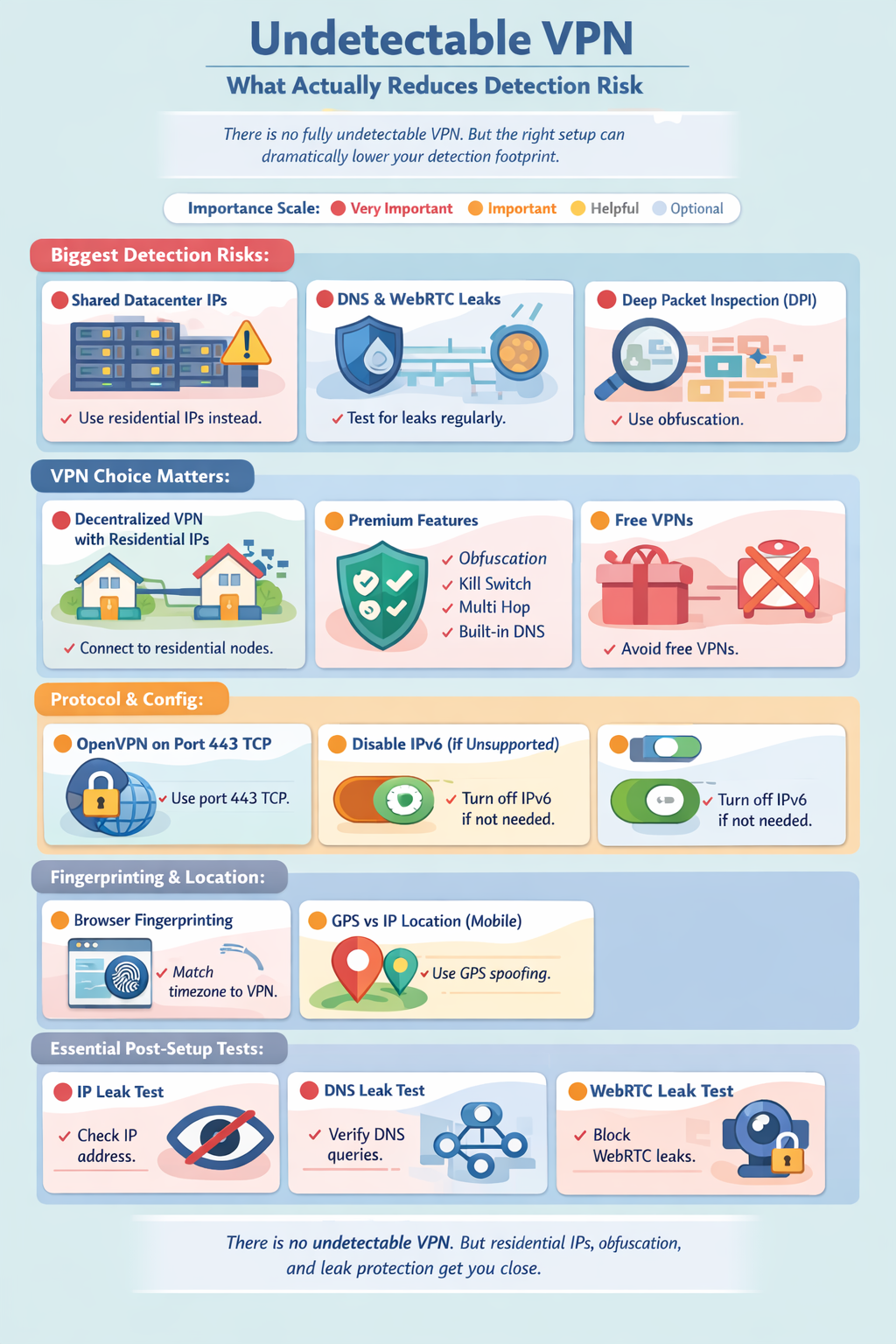
- Prefer a premium VPN. Premium VPN providers are typically more expensive but offer advanced features such as server obfuscation, a kill switch, multi-hop, and leak protection, which all help evade detection efforts.
- Ideally, go for a decentralized VPN. dVPNs most often utilize residential IPs, which are very difficult to distinguish from regular user traffic and drastically reduce the likelihood of being flagged or blocked, which is why we recommend them over centralized options.
Setting up your VPN to lower chances of detection
- Use a dVPN and connect to a residential node. This way you will avoid using datacenter IP addresses used by centralized VPNs and commonly blacklisted by online services. If you absolutely have to stick with a centralized VPN, pick one that can offer you a dedicated IP address that only you will use (you will have to pay extra for that).
- Enable advanced anti-detection features. Make sure that anti-detection features are turned on if they are available in your VPN: server or node obfuscation to protect yourself against DPI, a killswitch to stop the connection if your VPN protection drops, and multihop which routes your connection through several servers or nodes.
- Set your preferred VPN protocol to OpenVPN. Aside from being one of the fastest and safest protocols widely used by VPNs in the market, it can also be run through Port 443 TCP, which is important for the next step. Note: this step and the next one (#4) are done mostly to prevent detection by your ISP or network administrator.
- Set your VPN connection to run through Port 443 TCP. Some VPN detection techniques rely on detecting which port is used for a user’s internet connection, as certain VPN protocols commonly use specific ports unique to their configuration. Setting your port to 443 TCP allows you to circumvent this detection method, as it’s a port also employed by regular HTTPS internet traffic and is therefore much less likely to be blocked.
- Disable IPv6. Many VPNs don’t support the IPv6 protocol and can fall victim to a DNS leak because of that. Investigate whether your VPN supports it and if not, disable the protocol in the settings menu.
- Perform an IP leak test. Search for “what is my IP” and see if your real IP address and location are hidden. If not, try restarting your VPN and choosing a different node or server to connect to. If that doesn’t work, make sure that you have not set up split tunneling (a VPN exception) for your browser in the VPN settings. If your IP still leaks, you might have to change your provider.
- Perform a WebRTC leak test. If an online WebRTC leak test reports that you indeed have a leak, you can disable the WebRTC protocol in your browser settings.
- Perform a DNS leak test. You can find free DNS leak tests online. If a test reports that you indeed have a DNS leak, there are a few steps you can take to stop it. Firstly, make sure that your VPN uses its own DNS servers - the process here might differ depending on the VPN, so search how it can be done for your particular service. Secondly, you can reset the DNS cache. You can do so by running the “ipconfig /flushdns” command on a Windows device or “sudo dscacheutil -flushcache; sudo killall -HUP mDNSResponder” command on macOS. Finally, update your router firmware to the latest available version. With these steps completed, your DNS leak should be fixed.
Even though there is no such thing as an undetectable VPN, you will be as close as one can get after choosing the right VPN services and completing these steps.
Tips for using a VPN on Android/iOS
When using a VPN on your mobile phone, your phone’s onboard GPS will show a different physical location than the server of the VPN you connect to, possibly leading to an increased chance of VPN detection.
To address this, Android users can download apps called “location spoofers”, which will fake your location to the services you use (make sure to set it to the same city as the VPN server/node you’re connecting to).
Unfortunately, iOS users do not have the option to download such an app from the App Store. The only possible alternative to them is disabling Location Services altogether. To do this, go to Settings, then Location Services. Either flip the switch to turn them off as a whole or edit permissions for specific apps.
Having done this, keep in mind that no VPN is undetectable. Some apps can still recognize VPN usage by monitoring the phone’s network configuration, traffic behavior, IP address, and more.
What can you unlock by bypassing VPN blocks?
The world is yours after you successfully bypass a VPN block. You get access to a significantly wider variety of content, can take advantage of more free trials, and use Wi-Fi provided by your organization without fear of getting restricted.
Geo-restricted content
Do you want to see the latest episode of that niche Japanese game show where contestants have to guess which objects are edible? By avoiding their VPN blocks, you will be able to find that show on the Japanese library of your favorite streaming service.
Price discrimination benefits
Price discrimination is a common practice where online retailers and service providers adjust prices based on your location to match the purchasing power of different regions. A VPN can turn this into a money-saving opportunity by letting you switch your virtual location to find better deals. For example, flights, hotels, or subscription services might be significantly cheaper in South America or Africa than in Europe or the US. Connect to VPN servers in different regions, refresh the website, and watch the prices drop.
Government-banned content
Say you need to share a meme on Facebook, but you find yourself in an authoritarian country like China, where many social media platforms are banned. The only way to show your Facebook friends you’re still alive (and still have a sense of humor) is with a VPN, which allows you to bypass such bans. Note: as using non-government-approved VPNs in China is illegal, you assume the risk of being prosecuted by law enforcement.
Organisation-imposed restrictions
Your school or workplace might restrict which websites you can visit while using the internet provided by them. If you’re short on mobile data, you can visit any site you want using the organization’s internet connection after establishing a VPN connection successfully. In addition, you will be taking advantage of all the traditional VPN benefits: encrypted traffic, hidden IP address, and more.
Note: these benefits might be negated by tracking software installed in the device provided to you by your organization. To avoid that, make sure you’re using your private phone, computer or tablet.
Safer and possibly faster gaming
Games often restrict VPN use, as they can be taken advantage of to avoid IP-based bans. However, if you do get around their blockage, gaming with a VPN can protect your real IP address, so you can play confidently without the fear of your real location getting revealed or coming under a cyber attack. In some instances where the VPN server is closer to the game’s server than you, your connection might even be better.
VPN alternatives for bypassing restrictions
In conclusion, there is no such thing as an undetectable VPN. As a user, you can take certain steps to reduce the possibility of your VPN connection being detected though. The biggest impact is done by your choice of VPN - a decentralized VPN borrows a real person’s IP address for you to use, so it’s almost indistinguishable from a regular connection.
On the other hand, if VPNs are not your style, there are certain VPN alternatives available. They won’t make your VPN harder to detect but can serve you better depending on your needs. Tor, for example, brings you a very high level of security by routing you through two or more nodes but slows down your connection considerably as a result. In addition, you might just pop up on the FBI’s watchlist if you use Tor, as it’s normally connected with highly illegal activity such as drug dealing. Proxies are a lightweight alternative to VPNs - they allow you to change your IP address to appear as if connecting from another location but usually provide no encryption or security guarantees whatsoever. Remote desktops also provide little protection in themselves. Using them involves you directly controlling another, often virtual, computer.
All in all, a VPN still provides the most well-rounded set of functions for safe browsing, especially if it’s decentralized.