VPN logs: do no-log VPNs really exist?
“No logs” is one of the most powerful claims a VPN can make, and one of the most misunderstood. While many providers promise not to track users, logging is often unavoidable at some level. The real question is not whether logs exist, but what is logged, for how long, and who can access it. This guide breaks down how VPN logging actually works, why no-logs claims can be misleading, and how to judge whether a VPN truly protects your privacy.

Key takeaways
- No VPN operates without logs entirely, but the type of logs collected determines whether users can be identified.
- Usage logs pose the highest privacy risk, while aggregate and short lived connection logs are often unavoidable.
- No-logs policies rely heavily on trust, jurisdiction, and technical design rather than marketing promises.
- Decentralized VPNs reduce logging risk by architecture, limiting any single entity’s ability to collect user data.
VPN logging has been a hot topic of discussion since VPNs came into the mainstream. VPN logs are pieces of information that a VPN provider collects about its users. These pieces might include browsing history, IP addresses, and more. The type of information collected and how it’s used greatly varies with each individual VPN.
To protect yourself better from the misuse of your data, it’s important to choose a VPN that collects as little sensitive information as possible and handles the pieces it does collect with care and no malicious intent. You might be tempted to simply go for a no-logs VPN (also known as zero-log VPN) - an industry term for VPN services that pledge not to collect any usage logs connected to their users. However, no-logs is often little more than a marketing slogan; for example, 2020 saw 7 Hong Kong-based no-logs VPNs get exposed for collecting and keeping their users’ logs in an easily accessible server, according to PCMag.
In this article, we will arm you with the knowledge required to choose a trustworthy VPN service, understand which logs are the most risky, and why they exist in the first place.
What are VPN logs?
VPN logs are pieces of information that a VPN collects about its users and the service itself continuously throughout its operation. The types of information collected and how long it’s kept depends on each particular VPN provider and is usually reported in their privacy policy. This information is usually collected to improve services, but can sometimes be sold to other businesses or given away to authorities.
These logs can contain both personal and aggregate information alike. Individual logs report on individual users: IP addresses of the user and the servers they connected to, and DNS queries are some of the examples of what might be collected. These usually fall within Personally Identifiable Information (PII), as they can be used to identify a person when combined with other tidbits of personal info.
Alternatively, aggregate logs like server load information, crash reports, and other performance metrics are used to gauge the state of the VPN service overall and cannot be used to identify individuals.
Types of VPN logs
The aforementioned broad VPN logging categories (individual vs. aggregate) can be further broken down into types of logs based on the information collected. Most of these are important to be aware of, as they can be used to identify you when connected to other PII.
Connection and session logs
Connection and session logs typically contain information about the relationship between the user and the VPN service, but not what the VPN is used for. A few examples are:
- Timestamps: The date and time a user connects to and disconnects from the VPN.
- IP addresses: The user’s personal IP address and the IP of the VPN server they connected to.
- VPN protocol: Selected within VPN settings (e.g., OpenVPN, WireGuard, or other)
- Server location: City/area of the specific VPN server the user was connected to.
- Connection duration: How long a user stayed connected to the VPN server.
- Bandwidth usage: The amount of data transferred during the VPN session (especially important for free VPNs with traffic limits or dVPNs paid only for data used)
- Device information: The type of device used for connection, information about the operating system (Windows, iOS, Android, etc.), and its settings (region, language, and more).
These methods of VPN logging can be used for identifying a person if it gets into the wrong hands, however, it would have to be used together with other data to do so. For example, a government agency might trace a cybercrime to an IP of a particular VPN. Then they could seize that VPN server (if it’s within their jurisdiction) and try to extract a list of users connected to the server at the time of the crime.
Usage (activity) logs
Usage or activity logs relate to the actions a particular user takes when connected to a VPN. They are potentially the most dangerous type of logs if they were to be leaked or misused and often contain:
- Browsing History. The user’s browser resolves domain names (website names) using a VPN’s DNS servers, which indicate what websites or services were accessed and when.
- Browsing content. Even though most web traffic is end-to-end encrypted (e.g. using HTTPS encryption), some unencrypted content can be inspected and collected by a VPN provider.
- Files downloaded/uploaded. In some cases, metadata such as file size, and the server address for the download/upload can be tracked. A VPN company or government agency can deduct what kind of file was downloaded based on this metadata.
- Applications used. If an application connects to its servers (as most applications do nowadays), it can be identified through the ports and the IP address of the server used.
Error logs
Error logs are a recording of errors, warnings, and issues encountered by the VPN system (server) or VPN application (client). They are used by the VPN provider for troubleshooting system faults and improving on them. These can be:
- Aggregated error logs that record the status of the whole VPN system, a server cluster (one location), a singular server, or the VPN application (client). They are used to gauge the general health of a system and measure uptime. Aggregated error logs might record system failure performance metrics (e.g. number of connection failures over a period of time), most common error types, etc.
- Non-aggregated error logs can contain data related to a particular user and even a specific session when an error happened. This data could be: the user’s system (device, operating system, language), the timestamp of the error, an action that caused the error, the error type, and the VPN client version. Non-aggregated logs can be stored either on the company’s servers, or on the device of the user.
Aggregated logs
Aggregate(d) logs are a very broad category of logs that cannot be used to identify a singular user. These are usually data on server loads and uptime, numerous averages such as session time, connection speeds, and more, based on hundreds or thousands of users and/or sessions. This category of logs generally carries very little risk in case leaks occur or data is misused.
Aggregated logs are usually collected for analytics and anonymized, so VPN engineers could look into the weaknesses of their systems and improve on them. Such logs have two categories:
- Device aggregate logs: These logs are collected directly from users’ devices and may include metrics like app usage frequency, device type, or connection duration. They are used to understand device-specific performance trends and issues. Device logs are collected and kept on user devices, at least until they are synchronized with the broader system and anonymized.
- Server aggregate logs: In comparison, these are collected at the server level and include data on server load, geographical user distribution, and average session length. These logs focus on the overall performance of the server infrastructure rather than individual device behavior.
The list above is not exhaustive. VPN providers collect huge amounts of information for tracking the performance of their service, but not all of this information is important or risky to the end user. We only talked about the types of VPN logs that you should really be aware of.
Do VPNs keep logs?
VPNs with a no-logs policy claim to not record usage logs, and connection/session logs should be deleted shortly after the user disconnects if the VPN provider sincerely follows its no-logs policy. Other types of logs like aggregate or error logs can be kept for as long as the law allows it.
Decentralized VPNs, for example, are a type of VPN that cannot collect centralized logs due to their structure. More on their benefits can be found in the “What VPNs don’t keep logs?” section below.
Main reasons why companies keep VPN logs
Here are the main reasons VPNs keep logs, in order of importance:
- Legal compliance. A VPN has to follow the data retention laws of the country that it’s based in. Therefore, it’s best to choose a VPN based in a country with no data retention laws, such as Panama, The Netherlands, Switzerland, the British Virgin Islands, or others, according to VPNCentral.
- Troubleshooting and improving services. VPNs generally strive to provide as good a service as possible. To do that, they have to analyze the performance of their systems and improve on vulnerabilities, such as solving bugs, expanding the capacity of the most popular servers, and similar.
- Detecting abuse. VPNs protect their systems against external attacks and misuse by actual users, to make sure the service is available to all. For example, VPNs that officially have an “unlimited devices” policy will not, in fact, let you pin 9999 devices on a single account. Slogans like these need to be taken with a pinch of salt. For example, IP Vanish indicates that “multiple-party or non-individual use” may cause restrictions to your account.
- Rental server policies. Some VPNs rent virtual private servers (VPS), as they are cheaper than physical, “dedicated” servers, and that allows the services to avoid national laws. For example, a 2022 Indian law forces VPNs with physical servers in the country to keep logs for 5 years, as reported by Cloudwards. This has made many VPN providers replace physical Indian servers with virtual counterparts. A rental server, however, means that their actual owner might collect logs that could be retrieved by law enforcement or used with malicious intent.
- Intelligence agency influence. National intelligence agencies might force VPN providers to comply with their requests based on legislation not officially revealed to the public. PRISM, a US government policy that allows intelligence agencies to obtain user information directly from tech companies, is a good example described by The Verge.
Where are VPN logs stored?
VPN log storage locations often depend on their type: connection logs tend to be kept in the VPN servers the users connect to, while usage logs (if kept at all), financial, account data, and others are kept in separate servers under the company’s control.
Remember that, in theory, a no-logs VPN should not be storing usage or connection logs at all. Doing so goes against the very principle of a no-logs (or zero-logs) VPN.
How long are VPN logs kept?
The length of time VPN logs are kept depends on their type, the policies of a VPN provider, and the laws of the country the VPN is based in. Most VPN logs are deleted within 30 days, according to Privacy Canada.
You can find a table of the most notable countries with data retention laws and how long they either allow or require service providers to keep customer data below:
| Country | Required or allowed? | Data retention duration |
|---|---|---|
| China | Required | 2 months |
| Iran, Egypt | Required | 6 months |
| France, Spain, Hungary, Pakistan, Brazil, Greece, Ethiopia | Required | 1 year |
| Belgium, Ireland, United Kingdom, Denmark, Malta, Estonia, Latvia, Serbia, Slovakia | Allowed | 1 year |
| Australia, Mexico, Nigeria | Required | 2 years |
| Poland | Allowed | 2 years |
| Vietnam, Kenya | Required | 3 years |
| India, Russia, Colombia, South Africa, Indonesia | Required | 5 years |
| Italy | Allowed | 6 years |
Data reported by VPN Central and CyberGhost.
VPNs based in these countries would have to comply with the local laws when keeping customer data. As mentioned before, connection logs are usually kept in the VPN server itself, so it would fall under the jurisdiction of the country the server is physically in. This means that even though, for example, a VPN service is based in Switzerland, a country with no data retention laws, the connection logs of its users connected to a Mexican server would have to be kept for two years.
If the VPN proclaims itself as a no-logs VPN, that usually means it does not collect usage logs. Session or connection logs are commonly kept for analytics, troubleshooting and generally running the service. These are deleted quite shortly after collection. For instance, Surfshark, a prominent no-logs VPN, states that it deletes connection logs around 15 minutes after the end of a user session.
Of course, user data such as payment information or account data is kept for as long as the customer is using the service and even after that.
Decentralized VPNs are a type of VPN that uses nodes hosted by individuals instead of servers. Therefore, they are very unlikely to keep centralized logs, which makes them the better choice in this regard.
With that in mind, this sort of information is considered internal company policy and it’s quite difficult to answer a question like this conclusively. Our answer is the best estimate possible based on general industry standards and the little information available publicly.
Who can see your VPN activity?
There are several parties that can theoretically see your VPN activity:
- The VPN company. Naturally, the VPN service you are using can see your activity and record it in connection logs. This isn’t necessarily bad in itself if the logs are deleted immediately after your session ends, as that data tends to be used for analytics and improving the service. If the VPN keeps logs for longer, that begs the question - why? Decentralized VPNs have little to no ability to collect centralized logs on you. Keep that in mind when choosing a VPN.
- VPN server providers. In some occasions, such as the aforementioned India example, VPN providers rent both virtual and physical servers instead of setting up their own. The server owners still retain admin rights in these cases and can see the data of VPN users connected to the server. This data should be protected by non-disclosure agreements and fair business principles, but nevertheless, it’s something a regular user cannot be sure of and cannot do anything about.
- Your ISP. In normal circumstances, the ISP cannot see your internet activity while connected to a VPN, only that you are sending a lot of data to a particular server. They will be able to guess that it’s a VPN server. Your DNS requests can leak, however, if you are using a dodgy VPN service or it’s not set up correctly. This will make some or all websites you visit visible to the ISP, which, in turn, could give that data to law enforcement if asked.
- The authorities. Law enforcement or intelligence agencies could see your browsing data in the previous case of a DNS leak, or by asking your VPN service to give over your logs to them. If the VPN is based in the same country as the law enforcement agency that’s asking, the VPN will have to comply. Certain countries are part of intelligence-sharing alliances, such as the Fourteen Eyes alliance. This coalition—comprised of the United States, United Kingdom, Canada, Australia, New Zealand (the Five Eyes), and several European nations (fourteen in total) allows member countries to share surveillance data with each other. VPNs based in these countries may be required to hand over data to their own governments, which could then be shared with other nations in the alliance. Alternatively, sometimes government agencies simply seize VPN servers by force. For example, in 2022, 15 servers of VPNLab across 10 countries were taken by joint police forces on grounds of facilitating cybercrime, as reported by Security Week. This is why it’s important to use a VPN that collects as little information as possible, as logs cannot be seized if they’re not there in the first place.
- Bad actors. Hackers might see VPN user data by gaining access to VPN servers or internal systems. This is quite a rare occurrence, but can nevertheless happen. In 2018, a server owned by a partner of NordVPN was hacked by bad actors, according to Tech Radar. The hackers were able to steal some server data, even though the VPN service itself claimed that no user data was leaked.
To prevent your browsing data from being visible to third parties, always use a reputable VPN with no history of previous data breaches. In addition, check for possible DNS leaks by searching “DNS leak test” online and visiting one of the freely available tests when connected to a VPN.
Can you disable VPN logging?
In short, no, you cannot disable VPN logging as a user. This decision is made by the VPN provider only. On the other hand, some VPNs might have the option to disable crash reports or similar aggregated analytics collected and stored on your device, here’s an example from the Surfshark VPN app:
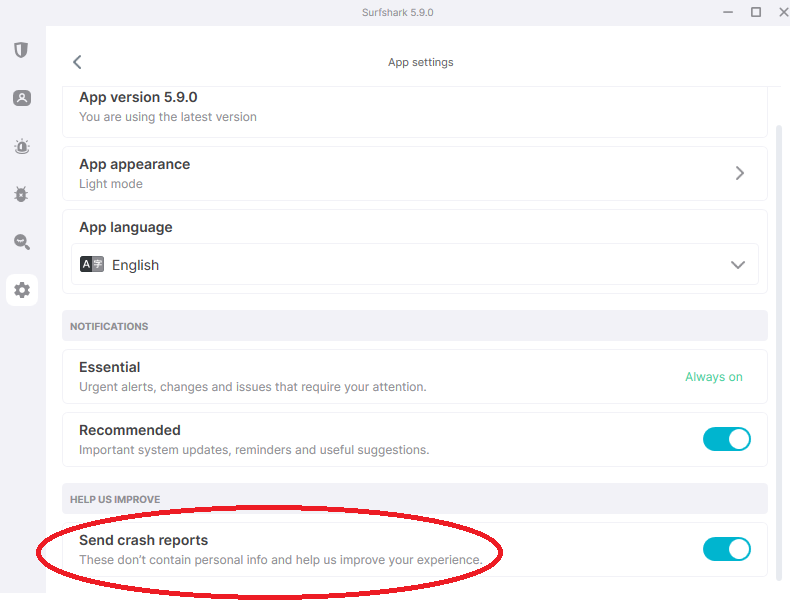
The only real choice you have here as a consumer is picking a VPN that collects as little of your data as possible. One of the clearest indicators of a good VPN in this aspect is a no-log policy. It is a promise to not collect and keep any unnecessary logs (this usually concerns usage logs in particular, connection logs are still generally kept for a very short time).
What is no-log VPN?
A no-log VPN promises not to track or store any information about your online activities, such as the websites you visit or the files you download. This type of information is also called a usage or activity log. The no-log policy is crucial for privacy-focused users because it gives more guarantees that even if the authorities request your data, there’s nothing to hand over.
It’s important to remember that a no-log policy is still just a promise, so it’s best to choose reputable providers that have been independently audited, even though this is not a guarantee either. This is expanded on in the next paragraph.
How do VPNs claim a no-logs policy?
VPNs claim no-log policies based on the reputation of their company, independent audits by external consultancies, warrant canaries, and jurisdictions in which they’re based.
Reputation. The world is more connected than ever before. If a VPN provider collects and leaks more data than publicly claimed, news can spread quickly, ruining the reputation of the brand forever.
Independent audits. No-log VPN providers often call on professional third parties, most often consultancy firms such as Deloitte, Cure53, KPMG, RoS, and others to test and publicly confirm their claims. Keep in mind, however, that these consultancies are hired by the VPN to do the audit at a previously arranged time, which theoretically allows the provider to hide any wrongdoings for the audit and continue them afterward. The audit result is just a snapshot in time.
Warrant canaries. These are continuously updated public statements that a VPN has not received and complied with any government requests for data.
Jurisdictions. If a VPN is based in a country with no data retention laws, theoretically it has less reason to keep logs. This, however, depends on the type of log, as connection logs are often kept in VPN servers (which usually are in another country than the VPN company is based in), while aggregated analytical or error logs could be kept in the VPN’s central database. The physical location of the log files affects the time they have to be kept.
Are no-logs VPNs legal?
In general, no-log VPNs are legal in most democratic countries around the world. Some countries, on the other hand, have data retention laws that force VPNs to keep certain logs for a specified amount of time. To reduce the chances of your activity being logged and kept, use VPNs based in countries with no data retention laws (Panama, Switzerland, etc.) and be wary of laws in the country of the server you connect to.
Some authoritarian governments, however, have more direct control over VPNs in their countries (e.g. China) and outlaw VPNs that do not comply with their data-sharing requests. A democratic government theoretically cannot punish a service provider for not handing over data it doesn’t collect in the first place.
What VPNs don’t keep logs?
Choosing a no-logs (or zero-logs) VPN is a good step in ensuring that your logs will not be collected. With that said, a no-logs policy is still just a promise based on the reputation of the company. Centralized VPNs (the ones that control all of their servers directly) have theoretical access to all of your unencrypted browsing data. A decentralized VPN, on the contrary, operates using nodes hosted by people all around the world instead of servers. As such, they have almost no technical capability to log your browsing activities in a centralized manner. If you want to improve your chances of not being logged, go for a decentralized virtual private network. You can find a summarized comparison of decentralized and centralized VPNs in the table below.
| Centralized VPN | Decentralized VPN |
|---|---|
| Servers directly controlled by the company | Nodes hosted by independent individuals worldwide |
| Access to usage and connection logs | Minimal to no technical capability for centralized logging |
| Can be vulnerable to security breaches or government pressure | No single point of control, making it harder to compromise |
| More easily blocked by governments or ISPs since servers are used by many | Harder to censor as nodes are distributed globally |
| User privacy depends on the provider’s goodwill and no-log policy | User privacy more robust due to decentralized architecture |
Here’s a list of popular VPNs that claim they don’t keep logs:
- Private Internet Access
- Mullvad
- PortalsVPN
- NordVPN
- CyberGhost
- Surfshark
- ProtonVPN
- iVPN
- TorGuard
- Hide.me
Tips for choosing a safer VPN
When selecting a VPN, ensure that it:
- Has never experienced a data breach. A previous data breach is a clear indicator of the unreliable nature of a VPN provider. Simply searching “VPN name data breach” should do the trick.
- Follows a strict no-logs policy. Make sure that the VPN you’re considering buying has a no-log policy audited by an external party, which would provide some reassurance about their data processing policies. Even better - pick a dVPN, as they have significantly less technical means of logging your activities from the get-go.
- Gathers the least possible data on your activity. A VPN cannot leak or keep information on your browsing if it doesn’t collect any. Closely inspect the privacy policy of VPNs you are considering to see precisely what data they collect and how long they keep it. Avoid any VPNs that keep usage logs.
By following these simple tips, you can choose a VPN that is the least likely to log and share your online activities by yourself. Picking a VPN doesn’t have to be complicated. Happy hunting!